
Update your El Camino Student Account
Your El Camino College student account is created using the information provided on your application for admission the first time you applied to El Camino College.
Once created, students need to use MyECC or submit the appropriate form to update or correct this information.
Change of Address, Email Address, or Phone Number
Students can update their address, personal email address, or phone number using MyECC.
- On the Need Help? card, click "Change of Address/Phone Number"
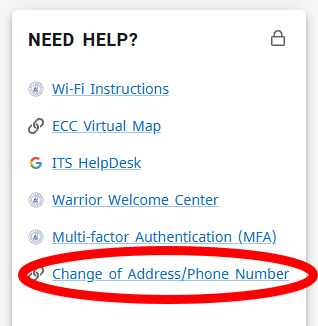
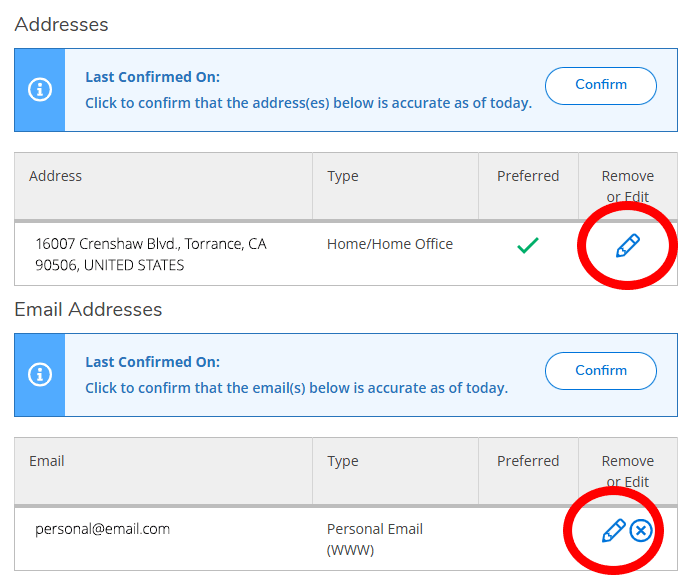
- On the About You page, scroll down to find your current addresses, email addresses, and phone numbers on file
- Click the pencil icon to edit the desired info
- Type your new info, then click the blue Update button
- MyECC will display a notification that the update was successful

Admission Forms
El Camino College's Admissions & Records Office has online forms for students to update or correct their information on file.
Forms require you to provide your El Camino College Student ID Number and @elcamino.edu email address.
Some changes also require you to upload documents for verification.
- Change of Major
- Name/
Gender/ Pronoun/ Date of Birth Change or Correction - Residency Reclassification Questionnaire — make sure to read Residency Information for help to complete this form
- Social Security Number Correction/
Account Merge — use this form to add your Social Security Number to your El Camino student account if you did not provide it the first time you applied- This form is also used for students who have multiple accounts, often the result of applying again with different personal identifying information
Additional forms can be found on the Admission Forms webpage.