
Confirm you Submitted an Application for Admission
Important update! El Camino College is now using CCCStart
After creating your OpenCCC account, you will be directed to CCCStart instead of the CCCApply application for admission. We will be updating our webpages with support for CCCStart in the coming weeks.
Students use CCCApply to submit an online application for admission to El Camino College. This is Step 1 of the Steps for Dual Enrollment.
Follow the instructions below to make sure you have successfully submitted an application.
Check your Email
After submitting an application for admission, students receive 2-3 emails right away. Emails are sent to the email address provided in CCCApply.
- The first email contains your CCCID, which starts with 3 letters (example: CXB1234). This email confirms you created an OpenCCC account. NOTE: This is not your El Camino College Student ID Number or Confirmation Number.
- The second email contains your 8-digit Confirmation Number (example: 32198765). This email confirms you successfully submitted an application
for admission.
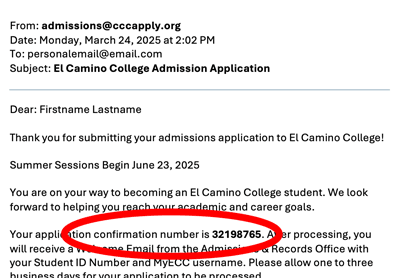
- K-12 students also receive a third email with information about Dual Enrollment at El Camino College.
If you only received the first email, it’s possible that you created an OpenCCC account but did not submit an application for admission to El Camino College.
Check CCCApply
Sign into CCCApply to look for your Submitted Applications.
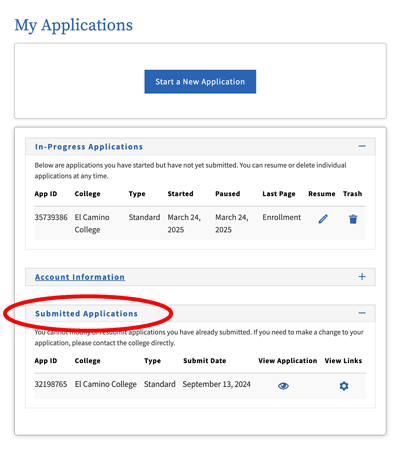
- Submitted Applications appear towards the bottom of the My Applications screen, like this:
- If you see an In-Progress Application, that means it has not been submitted. Click the Resume icon
 to resume your application. Complete each page, then review and submit your application.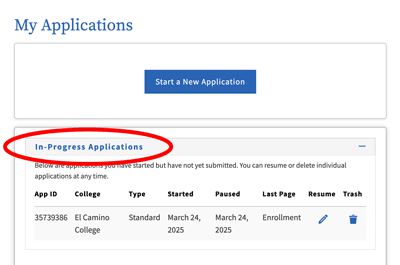
- If you see no Submitted or In-Progress applications, click the button at the top to Start a New Application. Complete each page, then review and submit your application.
For help to complete and submit your application, you may follow along (almost screen-by-screen) with this PDF:
Once your application appears under Submitted Applications, it can take a few business days to create your El Camino College student account and send your Welcome Email.