
Faculty Resource Guide
The Add Authorization period is consider late add (begins the day the class starts through the last day to add the class deadline). During this period a student can add the class if they are given the add authorization. An add authorization must be used by the Last Day to Add Deadline. Faculty you can shorten the deadline to use the add authorization (in high impacted courses some faculty give students a few days to add the course. If the student isn't officially enrolled the faculty can revoke the add authorization in order to issue another student the authorization to add before the last day to add deadline.
With Add Authroziation you are not adding the student, but giving them permission to add the class by the last day to add deadline, students still have to register for the class through MyECC. Please check your online roster regular to ensure it the all students are officially enrolled. If a student needs assistance adding the class they can come to A&R or fill out the online Add/Drop Form before the last day to drop deadline. Students will not be added after the deadline.
Faculty Guides
Faculty Guide for Add Authorization for Students on the Waitlist
Faculty Guide for Add Authorization for Students Not on the Waitlist
Faculty Guide for Revoking Add Authorization
Student Guides
Students on the Waitlist Add Authorization Guide
Students Not on the Waitlist Add Authorization Guide
*A student that have been dropped as a 'No Show/No-Active' can be given an add code during the Add-Authroization period or you can fill out the reinstatement form.
Online Class Rosters - Must be checked regularly during the late add period (the late add period is from the date the class begins - the Last Day to Add Deadline the class. (see: Understanding Section Deadline Dates). You will need to verify that students that are regularly attending your are officially enrolled. If a student needs assistance with officially adding the class they must come to Admissions & Records (A&R or submit an online Add/Drop form by the last day to add the class deadline. Students that are not officially enrolled or have not contact A&R by the deadline will not be added.
Dropping No-Show/Non-Participating Students - Students that are a No-Show or stop participating in the class prior to the last date to add must be dropped by the Last Day to Add Deadline for the class. (see: Understanding Section Deadline Dates).
No-Show students are students that never showed up to class
Non-Active--students that may have attended and in-person class/participated in an online class but have stopped attending/participating by the Last Day to Add for the section. Students that stopped particpating the last date of attendance or participation needs to be recorded per Title IV, Title V, and Education Code requires.
You are required to ensure you drop students by the last day to add deadline if they never attended a class/stopped attending/stopped participating. Due to Title IV (Federal), Title V, and Education Code Regulations, you will need to know the last date of attendance/participation if a student stops participating and/or attending class and record it when dropping students for No-Show/Non-Participating by the last day to add deadline for each section. During an audit the institution will have to provide this information.
The Census Certification (formerly referred to as No Show/Non-Active Drop Roster) must be completed the day prior to the census date (please see Census Dates information). No Shows/Non -Active Drop Roster begins when the class begins. Once all No Show/Non-Active students are dropped you will Certify your roster beginning on the day of Census
If you didn't have any students to drop during the No Show/Non-Active Drop period you still need to certify your roster. The Class Roster Census Certification First Drop.
CERTIFYING CLASS ROSTER (FORMERLY NO-SHOW REPORTING)
If a drop student contacts you and you wish to reinstate them please submit the online
Positive Attendance courses require documentation that needs to be maintained every
class session. Each student's hours need to be accounted for accurately every hour
the student attends the class. If your class has meeting times and dates in Colleague
you should use the Attendance tool in Self-Service which is available when you click
on the course and is a tab in the same area as the Waitlist. Documentation must be
collected for every class session and submitted to the A&R at the end of the course.
Here is a guide for entering positive attendance through Self-Service.
All grade (midterm and final) are submitted through Canvas. You can find the Submit Grades tab in Canvas. Make sure to select the appropriate tab when submitting midterm (used for grade forecasting only) or final grades.
Instructions for submitting incomplete grading is included on the PDF link.
Submit Final Grades to Colleague
If you need to make a change to a grade that you have submitted, contact your Division Office for the form.
Grade Change Petition (Student Initiated with Admissions and Records): If a student wants to dispute the grade assigned to them in the course, and you believe you have not made an error, they may fill about a Grade Change Petition Form.
- TheGrade Change Petition form begins in and is managed by the Admissions and Records Office
- When a student submits the petition, the Admissions and Records Office then forwards it to the faculty member for review. At this time, you may either deny or approve the petition. It is important that you complete this step promptly.
- Next, it proceeds to the Dean for denial or approval.
- The Admissions and Records Office then notifies the student of the decision.
Grade Change Appeal (Student Initiated with the Academic Affairs Office): If a student is dissatisfied with the outcome of their Grade Change Petition, they may file a Grade Change Appeal through the Academic Affairs Office. This process is managed by Araceli Palacios ([email protected]). The grade appeal process is described in detail in Administrative Procedure 4231 Grade Change and Board Policy 4231.
Instructions for logging on to the WiFi: Campus Wi-Fi
ITS Help Desk
The Help Desk is the primary source of information and assistance on telephone and computing services. No question should be considered too basic to ask!
For information about resources available to faculty through ITS, Click Here.
ECC ITS Help Desk - x6571 or 310-660-6571
Location: Communications Building
Hours: Weekdays, 8 a.m. to 4:30 p.m.
Telephone: (310) 660-6571
FAX: (310) 660-6134
Email: [email protected]
After-hour calls are taken via voice mail and calls are returned the following weekday morning.
Software Available for Faculty
ITS maintains a list of current software available to faculty.
EL CAMINO COMMUNITY COLLEGE
FISCAL SERVICES
EMPLOYEE COMPUTER LOAN PROGRAM
Effective December 1, 1995, an ongoing loan fund was established by the Board of Trustees
to assist employees
wishing to purchase computer equipment, software, and peripheral equipment. Equipment
purchased is intended to improve employee skills that can be used in the classroom
or on the job by non-teaching staff.
Requirements to participate in this program:
- Eligible Employees: All permanent ECC faculty, managers, and full-time classified staff.
- Maximum Loan: $4,000 - no interest, no penalty for prepayment.
Loan must be paid in full before a subsequent loan may be requested. - Interest Rate: 0%
- Repayment Method: Payroll deduction over 24 months. Deductions are effective on the 10th of each month for managers and classified staff and once monthly for full-time faculty.
- IMPORTANT: Quote must be submitted, eligibility verified and loan approved prior to purchase.
Computer Loan Process:
- Employee expresses interest in program by emailing [email protected]
- Please be sure that your email includes the following information:
Itemized quote from a legitimate vendor, including taxes. (Maximum loan amount is $4,000).
Employee’s full name, home address and cell/home number.
Quote must not include any additional items not covered by loan, unless they are free (warranty,
accessories, etc.).
California computer recycling fee. - Employee eligibility will be verified.
- Loan request will be submitted for approval.
- Employee will be notified if loan has been approved or denied, and the reason for any denial.
- If loan is approved, the employee will be contacted to review and sign contract.
- Check for loan amount will be processed and issued to employee for purchase of the approved item(s).
- Employee will deposit check and wait for funds to clear bank account before making a purchase.
- Original purchase receipt must be returned to Fiscal within 3 business days from purchase
date.
Receipt must only include items approved for computer loan purchase. No personal items please.
Please verify that the purchase receipt includes the employee's name, itemized items purchased, taxes, and form of payment.
Purchase receipt will become part of Fiscal’s records. Please keep a copy for your records. - Payroll will initiate 24 monthly payroll deductions until the total loan is paid in full.
PLEASE NOTE: If employee separates from employment with ECCCD, the remaining loan balance will
be deducted
from employee’s last payroll warrant (check).
Additional tips:
- Installation of software will be arranged by the employee and vendor.
- Warranty of the merchandise will be established in the name of the employee. ECCCD is not responsible for equipment.
- Warranties or protection plans are the employee’s responsibility and are not included in the computer loan program.
- Accessories such as; carrying cases, ipencils and headphones, are not included.
- Online purchases qualify.
- Inquire about educational discounts and discounts for government employees.
- Obtain approval from Fiscal Services prior to making a purchase.
For additional information about this program, feel free to email Araceli Rodriguez at [email protected]
El Camino College Copy Center Website
-
The Copy Center provides high-quality grayscale photo-copies at no charge to faculty,
and most programs and departments at El Camino College. Finishing options include:
collation, stapling, folding, and cut-to-size.
Located in Bookstore Building Room 128 (first floor, southwest corner)
310-660-3593 x6521
Hours: Monday - Friday 7:30am - 4:30pm
(Closed Fridays during summer sessions)
Production Coordinator: Sidney Smith, [email protected]
Use Copy Center Direct to upload files for printing.
Your syllabus must include the following information, per ACCJC standards.
I. Basic Information
- Heading: El Camino College
- Course Title, Course Number, Section Number, Units of Credit, Semester, Year, and any Prerequisites or recommended preparation.
- Exact meeting days, times, and location
- Instructor Name, Contact Information, and Office Hours
II. Course Scope
- Catalog Description - from the Course Outline of Record
- Course Objectives - from the Course Outline of Record
- Student Learning Outcome (SLO) statement - Divisions have SLOs posted to their webpage
- Required materials with approximate costs and textbooks (title, author, edition, ISBN)
- Grade Policy must include the following:
- Grading Rubric: specify the weight of each grade component.
- A minimum of four grades to support the semester grade for each student as required by the Academic Senate.
III. Class Policies
- Attendance Policy - Students are expected to attend classes regularly. Students whose absences exceed 10% of the scheduled class meeting time may be dropped by the Instructor.
- Academic Honesty Policy - Include a statement regarding Academic Honesty consistent with ECC policy and procedures (Board Policy 5500, Administrative Procedure 5500, and Administrative Procedure 5520 ).
- Special Accommodations (Disability Statement) - See Sample statement from Academic Senate
- Optional Statement: Instructor reserves the right to make modifications to this syllabus.
Here is the link for Barnes & Noble Textbook Adoption (AIP) platform. Here is a AIP help guide.
Here is a list of common textbook platforms and their WCAG Compliance status.
The Senate encourages faculty to consider including this information in their syllabi as a way of supporting student success (i.e., directing students to resources like our counselors) and addressing areas of concern, such as whether students must obtain permission to record in the classroom.
Several statements have links to additional information which can help provide some background or context.
Working in collaboration with campus stakeholders, the Senate has developed recommended syllabus statements which are suggested, and can be modified.
Here is a guide for submitting Office Hours and a video put together by Digital Art & Design Technology Faculty, Arnold Martin.
Information per Division (This section is in development):
- Mathematics: Please submit your syllabi to Aster Assefa ([email protected]), Please name the file in the following way. You will be asked to resubmit if you do not give a filename in the required way. Dept-Num-Sect-Term-Instructor.format For the section number, please use all four digits including the leading zero. For Instructor, please use your first initial and last name. The format must be DOC or DOCX or PDF. For example: Math-73-0144-Spring2021-INewton.pdf
Office Hours Requirement:
- Each Full-Time Instructor shall maintain up to four (4) office hours per week prorated to the Instructor's contractual instructional load rounded up to the nearest hour, effective Spring 2024. Each Full-Time Instructor shall maintain an office time schedule of at least three (3) hours per week on campus, that is mutually agreeable to the Faculty Member and their Dean, for the purpose of consulting with students.
- Part-time faculty may offer office hours with the goal of providing focused attention and additional learning support for students, but especially for racially minoritized students, to improve academic success. Office hours shall be payable in accordance with Article 10.9(a)(1). Part-time faculty office hours shall not be computed as part of the instructional workload.
Faculty Agreement - Article 8, Section 3 - Hours and Working Conditions
Information per Division (This section is in development):
Additional sample syllabi found on the Mathematical Sciences portal page
Online Class Rosters - Must be checked regularly during the late add period (the late add period is from the date the class begins - the Last Day to Add Deadline the class. You will need to verify that students that are regularly attending your are officially enrolled. If a student needs assistance with officially adding the class they must come to Admissions & Records (A&R or submit an online Add/Drop form by the last day to add the class deadline. Students that are not officially enrolled or have not contact A&R by the deadline will not be added.
Dropping No-Show/Non-Participating Students - Students that are a No-Show or stop participating in the class prior to the last date to add must be dropped by the Last Day to Add Deadline for the class. (see: Understanding Section Deadline Dates).
No-Show students are students that never showed up to class
Non-Active--students that may have attended and in-person class/participated in an online class but have stopped attending/participating by the Last Day to Add for the section. Students that stopped particpating the last date of attendance or participation needs to be recorded per Title IV, Title V, and Education Code requires.
The Add Authorization period is consider late add (begins the day the class starts through the last day to add the class deadline). During this period a student can add the class if they are given the add authorization. An add authorization must be used by the Last Day to Add Deadline. Faculty you can shorten the deadline to use the add authorization (in high impacted courses some faculty give students a few days to add the course. If the student isn't officially enrolled the faculty can revoke the add authorization in order to issue another student the authorization to add before the last day to add deadline.
With Add Authroziation you are not adding the student, but giving them permission to add the class by the last day to add deadline, students still have to register for the class through MyECC. Please check your online roster regular to ensure it the all students are officially enrolled. If a student needs assistance adding the class they can come to A&R or fill out the online Add/Drop Form before the last day to drop deadline. Students will not be added after the deadline.
Faculty Guides
Faculty Guide for Add Authorization for Students on the Waitlist
Faculty Guide for Add Authorization for Students Not on the Waitlist
Faculty Guide for Revoking Add Authorization
Student Guides
You are required to ensure you drop students by the last day to add deadline if they never attended a class/stopped attending/stopped participating. Due to Title IV (Federal), Title V, and Education Code Regulations, you will need to know the last date of attendance/participation if a student stops participating and/or attending class and record it when dropping students for No-Show/Non-Participating by the last day to add deadline for each section. During an audit the institution will have to provide this information.
The Census Certification (formerly referred to as No Show/Non-Active Drop Roster) must be completed the day prior to the census date (please see Census Dates information). No Shows/Non -Active Drop Roster begins when the class begins. Once all No Show/Non-Active students are dropped you will Certify your roster beginning on the day of Census
If you didn't have any students to drop during the No Show/Non-Active Drop period you still need to certify your roster. The Class Roster Census Certification First Drop.
Sometimes you may drop a student who then contacts you asking to be added back into the class (i.e. reinstated). A student dropped from a class may only be reinstated upon recommendation of the instructor. Students had to be officially enrolled in the class (appeared on class roster, not the waitlist). If this occurs, the instructor will need the student’s ECC ID number and to fill out the form below.
Positive Attendance courses require documentation that needs to be maintained every
class session. Each student's hours need to be accounted for accurately every hour
the student attends the class. If your class has meeting times and dates in Colleague
you should use the Attendance tool in Self-Service which is available when you click
on the course and is a tab in the same area as the Waitlist. Documentation must be
collected for every class session and submitted to the A&R at the end of the course.
Here is a guide for entering positive attendance through Self-Service.
Go to office and log in to your ECC email account via myECC log in.
Click "new Mail"
Click "BCC" button
This window will open
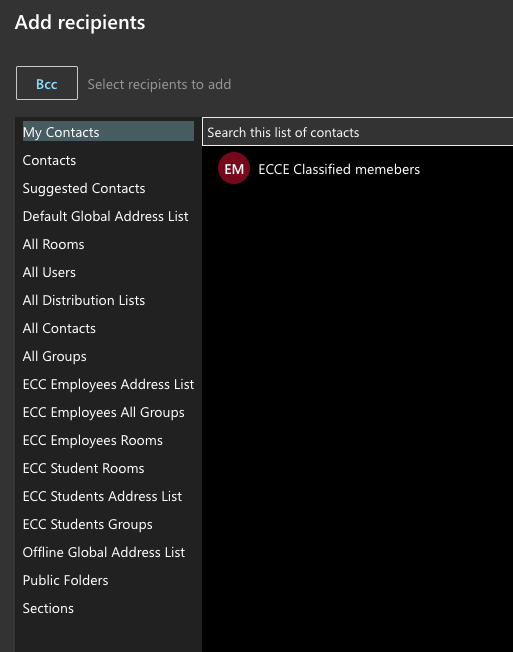
Click "Sections"
Type in your course name Example:
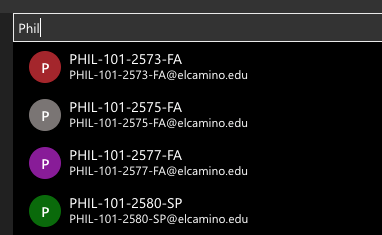
Once you see your course selected it by clicking the "+" button.
Then click save, it will go back to the email so you can finish composing message.
Faculty can waive a prerequisite for a student in MyECC Self-Service allowing a student to register for the section. Faculty can only waive the prerequisite for the term section they are teaching the course.
- Navigate to the term and courses and select the course you are issuing the waiver
select the permission tab
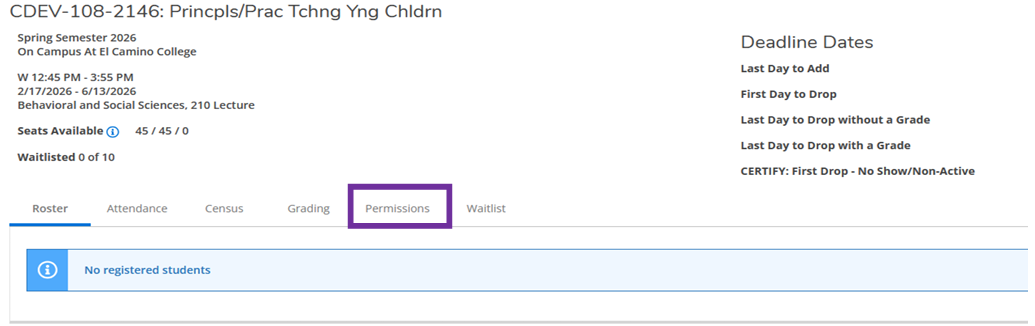
- Select Requisite Waiver
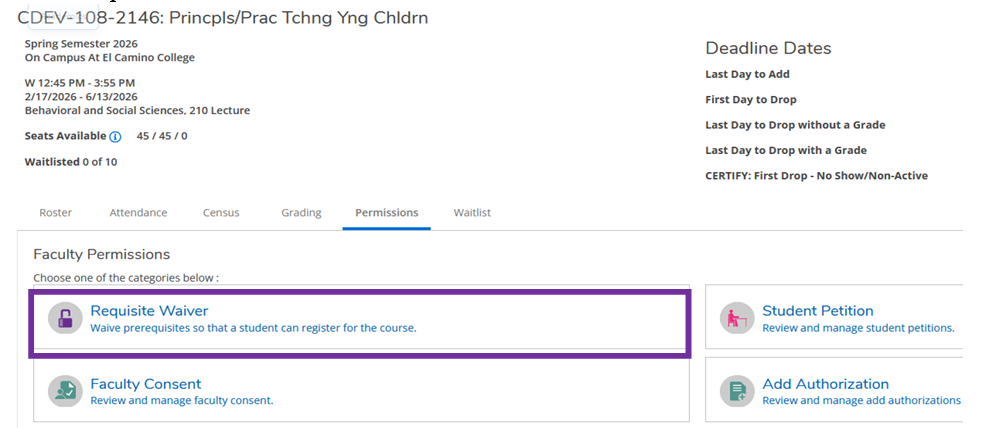
- a. The requisite waiver displays the prerequisite and/or corequisite being cleared for the student
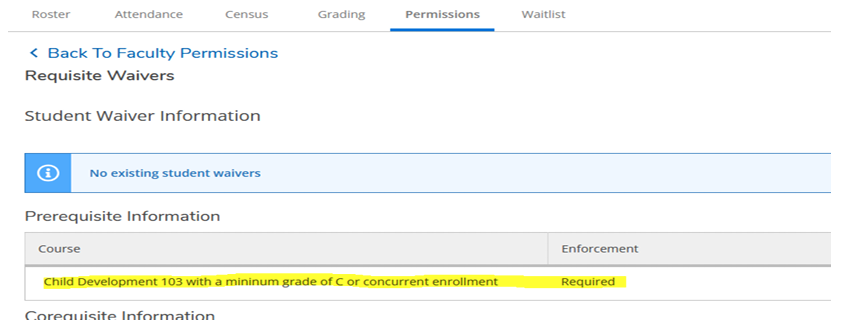
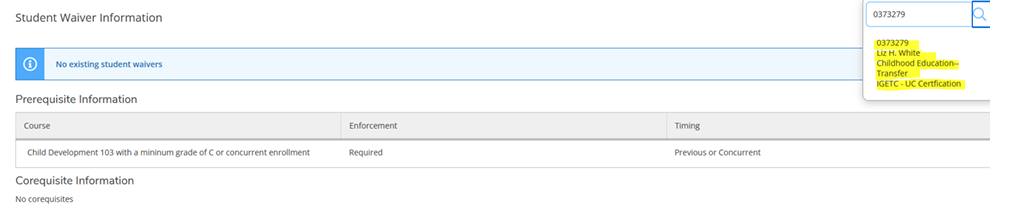
- Enter the student ID number and verify this is the correct student. If correct click
on the student information
a. A window will pop up for you to approve the clearance. You must enter a comment of why you are waiving the prerequisite before it will allow you to save.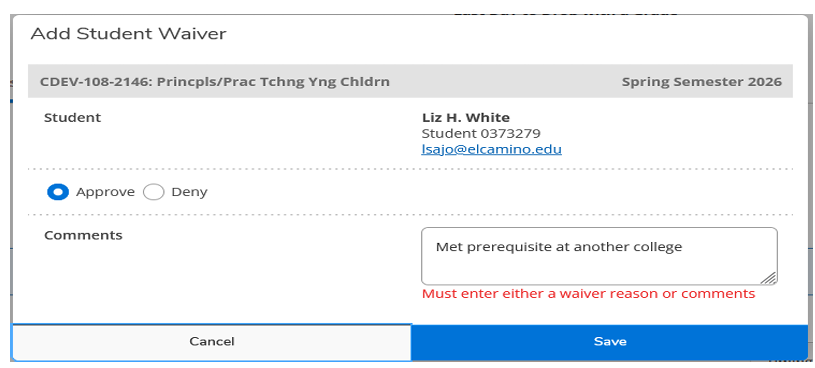
b. Once saved it will display the student(s) that you have issued the waiver to. The student will be able to register for this section.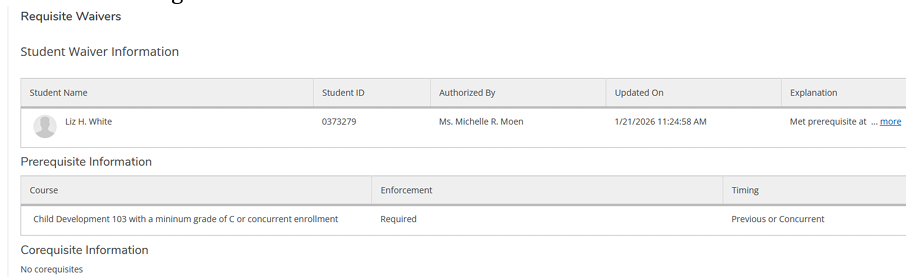
NOTE: If it is during the ADD AUTHORIZATION period (late add) you will need to grant an add authorization as well. Information on the Faculty Resources Guide: Important Information for Faculty from A&R.
(This section is in development)
Tutor, TA, Grader, or Coach to Canvas: https://forms.office.com/r/YL0whsNdKT
Admin, Counselor, Librarian, or other faculty/staff: https://forms.office.com/r/eGkiyRNQju
All grade (midterm and final) are submitted through Canvas. You can find the Submit Grades tab in Canvas. Make sure to select the appropriate tab when submitting midterm (used for grade forecasting only) or final grades.
Instructions for submitting incomplete grading is included on the PDF link.
Submit Final Grades to Colleague
If you need to make a change to a grade that you have submitted, contact your Division Office for the form.
Grade Change Petition (Student Initiated with Admissions and Records): If a student wants to dispute the grade assigned to them in the course, and you believe you have not made an error, they may fill about a Grade Change Petition Form.
- TheGrade Change Petition form begins in and is managed by the Admissions and Records Office
- When a student submits the petition, the Admissions and Records Office then forwards it to the faculty member for review. At this time, you may either deny or approve the petition. It is important that you complete this step promptly.
- Next, it proceeds to the Dean for denial or approval.
- The Admissions and Records Office then notifies the student of the decision.
Grade Change Appeal (Student Initiated with the Academic Affairs Office): If a student is dissatisfied with the outcome of their Grade Change Petition, they may file a Grade Change Appeal through the Academic Affairs Office. This process is managed by Araceli Palacios ([email protected]). The grade appeal process is described in detail in Administrative Procedure 4231 Grade Change and Board Policy 4231.
Periodic evaluation is a growth mindset process with the intent to improvement of instruction, counseling and other educational services in support of our Faculty Members' development and our students' success.
Probationary Full-Time Faculty Members will be evaluated five (5) times during their first four (4) years of employment. Tenured Faculty Members will be evaluated every three (3) years from the last evaluation. Part-Time Faculty Members shall be evaluated during the first or second semesters of employment. Thereafter, the Part-Time Faculty Member will be evaluated at least once every 5 semesters of employment.
The Dean, Associate Dean, or Director shall notify the evaluatee and evaluator(s) by the last work day of the second week of instruction of the semester in which an evaluation will occur. The evaluation of consists of (1) a self-evaluation, (2) student surveys, and (3) peer evaluations. An evaluation by the Dean/Associate Dean/Director is included for probationary Full-Time Faculty. The peer evaluation will include (1) classroom or learning management system (LMS) or work site observation by the evaluators and/or the Dean/Associate Dean/Director, (2) the Probationary Faculty Evaluation Conference with the evaluatee, and (3) a review of the student survey results.
The evaluation conference will be held no later than the end of the fourteenth week of the semester by the Dean, Associate Dean, or Director during each of the five probationary evaluations.
Each probationary Faculty Member will five evaluations in their first four years.
The evaluation will consist of a self-evaluation, student evaluations, peer evaluation, and the evaluation by the Dean.
A new faculty member employed by the District as a full-time Instructor is classified as contract (probationary) during the first four (4) years of service with the District.
A faculty member who has served as a contract (probationary) Faculty Member for four consecutive years and who is employed by the District in the subsequent and following years, is classified as regular (permanent).
Upon satisfactory evaluation during the fifth semester, the evaluation panel will meet during the seventh semester to evaluate and recommend whether or not to grant tenure.
Full-time faculty are required to participate in the Spring semester graduation ceremony every 3 years as assigned by the Academic Senate.
Counseling Services is located on the first floor of the Student Services Building and offers many fine programs to promote student success such as First Year Experience, Project Success, and Puente.
Career, matriculation and transfer services are offered through Counseling Services along with online counseling and a new student orientation.
Library Support for Faculty Guide
Including how to book a library session for your class, how to add library resources to Canvas, and how to access and use all library materials.
Request a Library Instruction Session
A librarian can visit your class or guide your class in using library resources! We are happy to work with you to find a day and time.
Each Academic & Career Pathway has an assigned Librarian Liaison, check your liaison here.
Fill out the Supplemental Instruction request form to request Supplemental Instruction.
To recommend a tutor fill out the Faculty Recommendation for a Tutor form.
El Camino College strives to create a welcoming environment in which individuals are respected, feel included, accepted and have a sense of belonging. Below you will find communities to support the diversity of our campus as well as academic support programs to support your educational needs.
Full-Time Faculty
As noted in Article 8, Section 22 of the faculty contract,
- Each 10-month Full-Time Faculty Member shall be responsible for 24 hours of Professional Development. This includes attending both Fall and Spring PD Day (6 hours total) and completing 4 hours of racial equity professional development.
- Each 12-month Full-Time Faculty Member shall be responsible for 9 hours of Professional Development. This includes attending both Fall and Spring PD Day (6 hours total) and completing the remaining 3 hours through professional development activities of their choice.
- Full-Time Counselors shall be responsible for 9 hours of Professional Development. This includes attending both Fall and Spring PD Day (6 hours total) and completing
the remaining 3 hours through professional development activities of their choice.
Faculty who do not fulfill their 2026-2027 flex obligations will have their pay deducted for any of the flex hours not completed.
Part-Time Faculty
Under the new faculty contract, each part-time faculty member may complete up to 2 hours of professional development activities for every semester unit taught during the fall and spring semesters, up to a maximum of 10 hours per semester.
Please note that your semester stipend already includes compensation for up to four
hours of required District trainings, such as Keenan trainings. Because these required
trainings are already included in your stipend, they do not count toward your additional
paid PD hours unless you are required to complete more than four hours of District-required
training during the same semester.
While professional development (flex) hours are not required for part-time faculty, participation is strongly encouraged.
Each year all Full-Time Faculty are required to fill out their Professional Development Plan as part of the College's commitment in having a flexible calendar. For more information about the flexible calendar program, see "Why is Professional Development Called Flex in the Contract?"
Log in to Cornerstone, which is our Professional Development system and sign up for live sessions or watch a variety of videos.
If you register for an event directly from the Cornerstone calendar, select show more. The following question will appear: “ECC – Did this activity provide opportunities to learn about anti-racism and/or racial equity?” The answer will indicate if it is a Senate-approved racial equity focused professional development training.
Professional Development that fulfills Distance Education Certification Maintenance is denotes as Online Training.
Faculty can also complete professional development outside of the Cornerstone. To learn about approved activities check out the Professional Development Categories and Activites List.
Are you hosting an event? Is the event flex eligible for faculty?
Professional Development and Learning is available to assist with your event registration in Cornerstone!
- Fill out this Activity Proposal Form.
- Once your event is entered in Cornerstone you will receive an email confirmation.
- Now people can register for your event through Cornerstone. As an event host, you are able to track registration and easily take roll for your event! (Please note: event registration is not available to students.)
- After your event, you are responsible for submitting attendance, our department will give you presenter flex credit after the event attendance is submitted.
Presenters also earn triple flex credit for each one-hour session.
x3 For the first time you present the material
x2 The next time(s) you present it
In the event you add yourself to the roster as an attendee, please contact our department so we may remove you from the roster.
If you have any other questions or concerns, please contact us at [email protected].
Flex refers to the Flexible Calendar program, which allows the college to offer 18 week instead of 16 week classes.
If you have questions regarding Professional Development, please refer to our FAQs links listed under the Professional Development website.
To maintain the ability to teach Distance Education (DE), you must take 10 hours of DE Professional Development every 5 years. (i.e., An average of one hour/semester.)
Questions regarding Distance Education? Contact: [email protected]
If a PD topic covers both DE and DEI, it can be applied to both categories
Note: To find your spreadsheet, search your Shared documents in OneDrive for a document
labeled
LastName_FirstName-DE-Cert-Maint.xlsx. For questions about your spreadsheet email [email protected]
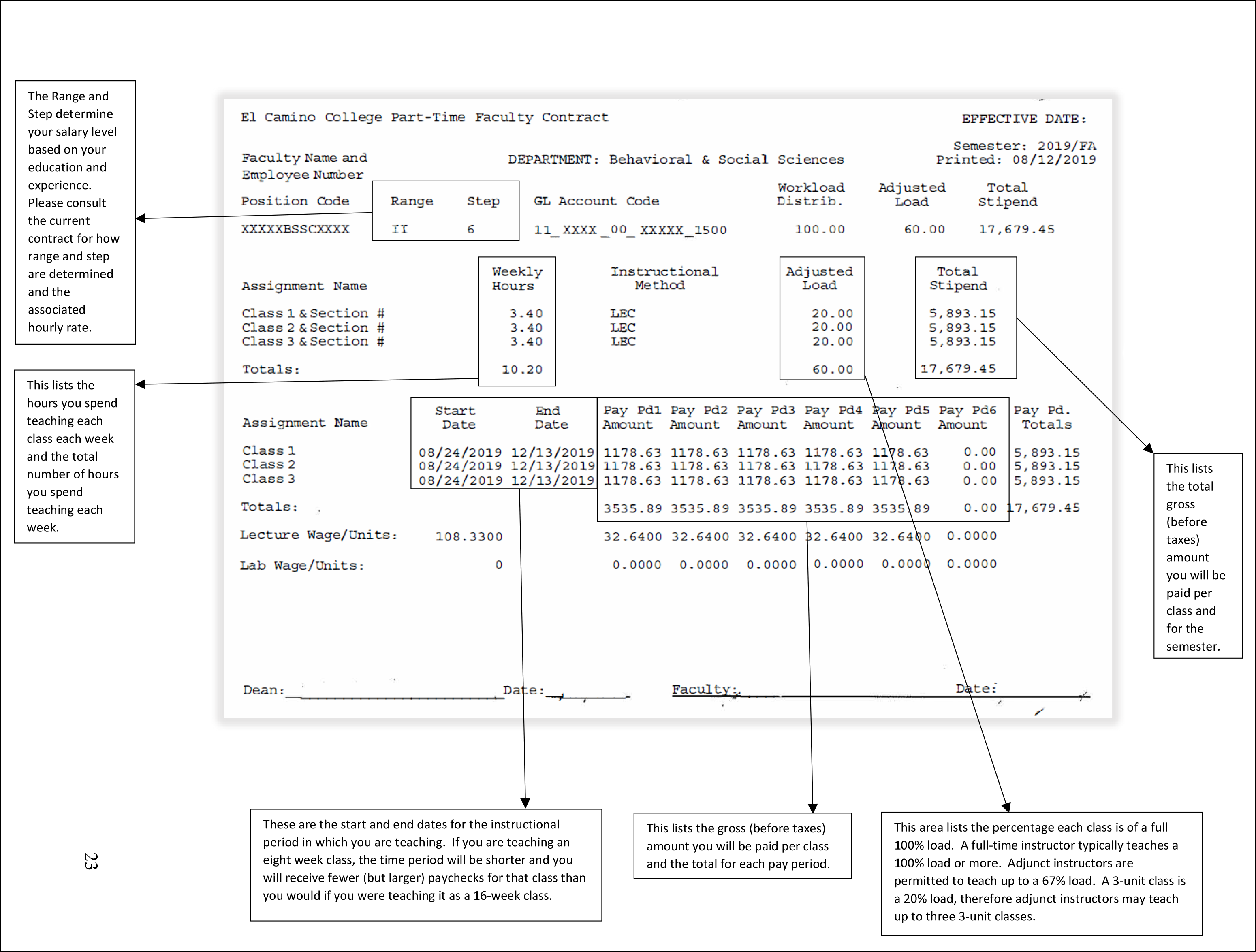
Faculty ID Number
You will need your Employee ID number for several things
- Log in to Canvas
- Click on People
- Click on your name
Payroll ID
Your Payroll ID can be found on your paystub or by contacting [email protected].
Find it by logging in to your digital pay stub: https://elcamino.lacoe.edu/ It is listed as Employee ID on your paystub. This is different from your faculty/colleague ID.
Reach out to Bryan Kawakami for Part-Time Instructors and Leilani Abyad for Full-Time Instructors.
Academic Senate
The ECC Academic Senate fosters the effective participation by community college faculty in all academic and professional matters; develops, promotes, and acts upon policies responding to college wide concerns; and serves as the official voice of the faculty of El Camino College in academic and professional matters. Visit the Academic Senate website for representative information and meeting times.
- Curriculum, including establishing prerequisites and placing courses within disciplines
- Degree and certificate requirements
- Grading policies
- Educational program development
- Standards and policies regarding student preparation and success
- District and College governance structures as related to faculty roles
- Faculty roles and involvement in accreditation process, including self- study and annual reports
- Policies for faculty professional development activities
- Processes for program review
- Processes for institutional planning and budget development, and
- Other academic and professional matters as mutually agreed upon between the Board of Trustees, and the Academic Senate
-
Curriculog
El Camino College uses Curriculog for curriculum management and approval. There are many ways to use Curriculog, including proposing a new course, conducting a standard course review, conducting a full course review, etc.
Use the user guides created to assist in the use of Curriculog.
SLOs
El Camino College is committed to a continual cycle of assessing and improving student learning. To assist us in this process, learning outcomes have been developed at the institutional level (ILOs) and for all programs (PLOs) and courses (SLOs) at El Camino College. Creating, locating, editing, and reporting on PLOs and SLOs is done through Nuventive, the new software tool El Camino College uses to manage learning outcomes.
Nuventive helps faculty document the decisions made and the actions taken after analyzing SLO assessments. Nuventive serves as a reminder of teaching strategies and action plans developed in response to any identified gaps in student learning. Ultimately, Nuventive provides a way to document a program's successes and how well the college is meeting its goals.
Training sessions for Nuventive and workshops on learning outcomes assessment are offered to faculty and staff each semester. A schedule of trainings and workshops is distributed at the beginning of each semester and can also be found on the SLO webpage. SLO Coordinators and division SLO Facilitators are available throughout the year to assist with Nuventive and SLOs. Visit the SLO webpage to learn more about principles of assessment at El Camino College and to access SLO and PLO faculty resources:
Student Learning Outcomes (SLO) webpage
Part-Time Faculty Reimbursement for Assessment
Part-Time Faculty are required to participate in SLO assessment. Whether or not you receive supplemental pay depends on the kind of assessment work you do. The contract requires you to collect assessment data as part of your instructional responsibilities. Collecting and sharing assessment data does not receive additional pay. Anything beyond this requires extra pay and Dean's approval.
Part-Time Faculty can be paid up to 5 hours at D-3, Rate IIO
Program review is a tool used by program personnel at El Camino College to critically evaluate the services offered by the program and to recommend necessary improvements that address the needs of the college and the community.
-
The Accrediting Commission for Community and Junior Colleges (ACCJC) accredits associate degree granting institutions in the Western region of the U.S. ACCJC operates under the corporate entity the Western Association of Schools and Colleges (WASC). The ACCJC is one of seven regional accrediting commissions. The ACCJC is authorized to operate by the U.S. Department of Education through the Higher Education Opportunity Act of 2008.
Accreditation is a voluntary system of self-regulation developed to evaluate overall educational quality and institutional effectiveness. The ACCJC accreditation process provides assurance to the public that the accredited member colleges meet the Standards; the education earned at the institutions is of value to the student who earned it; and employers, trade or profession-related licensing agencies, and other colleges and universities can accept a student’s credential as legitimate.
- The Comprehensive Integrated Plan is the guiding document for campus. The microsite include Mission, Vision, and Values, as well as the Goals for campus, and the campus plans (Education, Technology, Facilities, and People).
- Evolve is El Camino's Guided Pathways initiative. Guided Pathways is an integrated and institution wide framework based on intentionally designed clear and coherent structured educational experiences that promotes better enrollment decisions and prepares students for future success. The Guided Pathways framework integrates support services in ways that make it easier for students to get the help they need to reach their goals while at El Camino College.
-
Guided Pathways
- All majors are divided into Meta Majors and each Meta-Major .
-
Academic Senate
- Academic Program Review Committee
- Academic Technology Committee
- Assessment of Learning Committee
- Educational Policies Committee
- Online and Digital Education Advisory Committee
- College Curriculum Committee
- Faculty Development Committee
Calendar Committee
Campus Technology Committee
College Council
- Professional Development Advisory Committee
- Student Success Committee
- Institutional Effectiveness Committee
Facilities Steering Committee
Planning and Budget Committee
-
Academic Honesty Committee
Accreditation Committee
Area Councils
Comprehensive Integrated Planning Committee
Enrollment Management
Guided Pathways Steering Committee
Insurance Benefits Committee
OER/ZTC Advisory Committee
Parking and Traffic Control Committee
Workplace Health and Safety Committee
-
Division Council
Division Curriculum Committee
Division Load Committee
Metamajor Committee