
Using the Online Class Schedule
The Online Class Schedule displays up-to-date information about classes being offered by El Camino College.
Users can search for classes by term, subject, course number, and more!
High school students search for classes before selecting College Campus or Online classes in DualEnroll.
Search for Classes
The Online Class Schedule displays important notifications and notes at the top, followed by Advanced Search fields to search for classes.
To perform a simple search, use the following fields:
- Term: select the term for which you would like to view classes (Fall Semester 2026, Winter
Term 2027, etc.)
- To search for classes which have not yet started: for Meeting Start Date, enter tomorrow's date
- Subject: select the course subject (History, Psychology, English, etc.)
- Course Number: enter the course number (C1000, 1, 101, etc.) (leave blank if you are unsure)
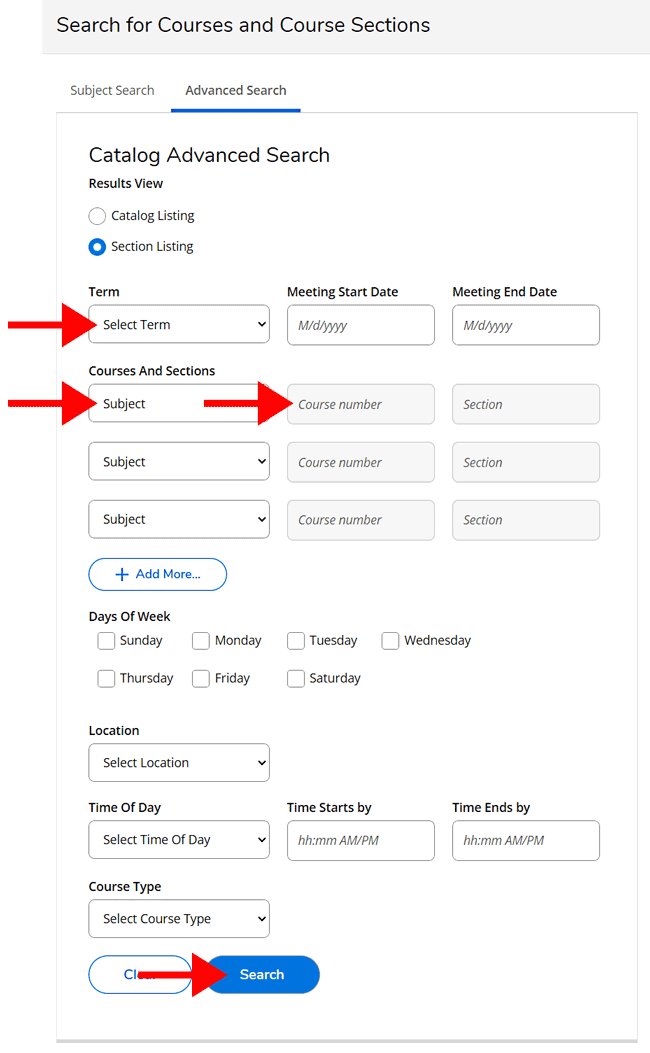
Then click the Search button.
Search Results
For this example, we've selected term Fall Semester 2026, subject History, and course number C1001 — then clicked the Search button.
The results display in a table. Click a column heading to sort by that column. There may be multiple pages of results.
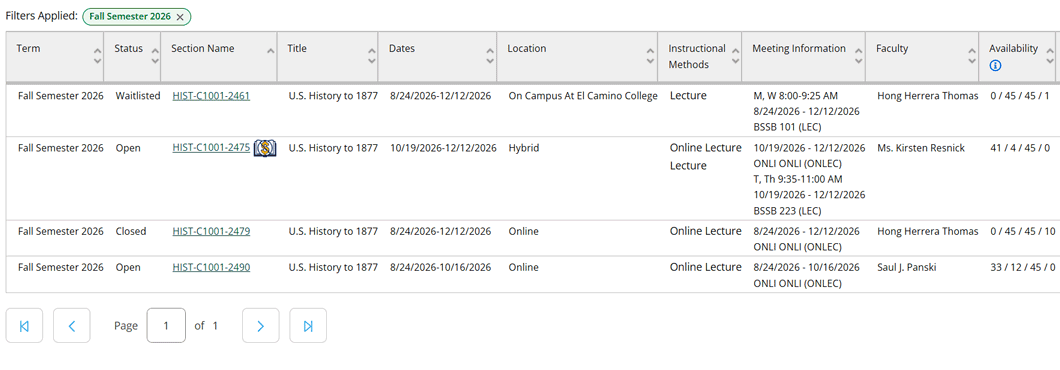
Each class section will display:
- Section Name with unique 4-digit number. Click the Section Name to view important details — like if the class has any prerequisites or a requires a support class
- Dates of the class
- Location indicating if the class is On Campus at El Camino College, Online, or Hybrid
- Meeting Information with class days/times and room number
- Faculty name of instructor
NOTE: The  icon next to HIST-C1001-2475 indicates that class has a Zero Textbook Cost. Other sections will have required textbooks which registered students will need
to purchase. Search for Course Materials
icon next to HIST-C1001-2475 indicates that class has a Zero Textbook Cost. Other sections will have required textbooks which registered students will need
to purchase. Search for Course Materials
Status and Availability
Each class section will also display a Status. The status will update as students register for the class.
- Open (has seats available)
- Waitlisted (no seats available)
- Closed (no seats available, waitlist is also full)
Check the Availability column to view the current number of seats available or number of students on the waitlist.
In the example above, HIST-C1001-2461 has an availability of "0 / 45 / 45 / 1" which indicates:
- 0 seats are available (the class is full)
- 45 seats are taken
- 45 seats is the capacity for the class
- 1 student has joined the waitlist
The student currently on the waitlist has Rank #1. The next student to join this waitlist would be Rank #2, and so on.
For more info, see What if my Approved Class is Waitlisted or Closed?
Support Classes
Some (not all) sections of ENGL C1000, STAT C1000, and MATH 120, 130, 170, 180, and 190 are linked to a required 1- or 2-unit support section.
Examples:
- ENGL 0100S — Academic Reading and Writing Support
- STAT 0100S — Introduction to Statistics Support
- MATH 180S — Precalculus Support
These sections are designed for students who place into English or Mathematics with support. Each parent section is linked to a specific support section taught by the same instructor.
Click the Section Name to check for any Requisite courses:
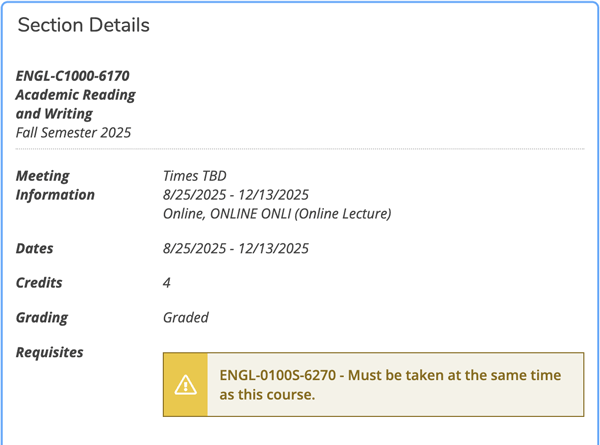
A complete list of Corequisite/Parent Courses by term can also be found on the Class Schedules webpage.
High school students can register for a class with a linked support section, but must commit to taking both classes. Make sure to select both the specific parent class section and the required support class section in DualEnroll.
Filter Results
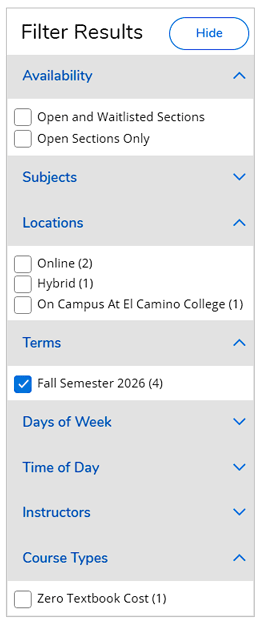
Search results can be filtered by Availability, Location, Term, Day of Week, Time of Day, Instructor, and Course Type.
This is useful to view Open Sections Only — or only sections which are Online or On Campus At El Camino College.
Select classes in DualEnroll
After searching for available classes, high school students select their desired class sections in DualEnroll to initiate registration for those classes.
This is Step 3 of the Steps for Dual Enrollment.