
What if my Approved Class is Waitlisted or Closed?
Once a class section reaches capacity (no seats available), students can no longer register for that section. Instead, they can join the waitlist.
A waitlist is a list of students who are interested in enrolling if seats in the class become available. Joining the waitlist is not a guarantee of being able to participate in the class, but it does hold your place if seats become available.
High school students complete steps in DualEnroll to join a waitlist.
How do I know if a class is full?
Students use El Camino College's Online Class Schedule to search for classes.
Each class section displays the number of seats available and a status of Open, Waitlisted, or Closed.
Follow this tutorial for support to find classes with seats available:
Select Option in DualEnroll
In DualEnroll, high school students who are approved for a class which is Waitlisted have a status of "Student: Section Full - Select Option"
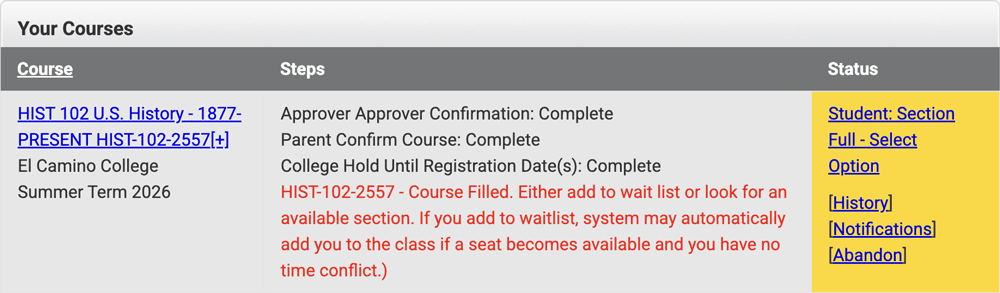
Click on "Student: Section Full - Select Option" to either
- Select a different class section with seats available — check the Online Class Schedule!
- OR join the waitlist for this class section
- OR cancel the registration
NOTE: You can only be registered or waitlisted for one of the same course. For example, you cannot register for more than one HIST C1001 class, or register for one HIST C1001 and waitlist another.
Join the Waitlist
To join the waitlist, select the option "Request placement on the waitlist for my originally selected section," then click the COMPLETE STEP button.

Your status will update to "College: Add Student to Waitlist" — this is a step for El Camino staff to perform.
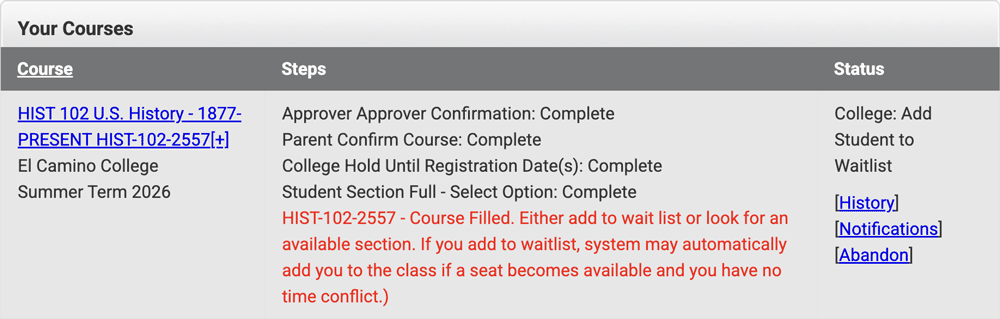
Once you are added to the waitlist, your status will change to "Complete."
In this case, "Complete" means you have been added to the waitlist. It does not mean you are registered for this class.
Check MyECC
In MyECC, you can Check your Registered & Waitlisted Classes.
Waitlisted classes will show a brown checkmark and display "Waitlisted" (as below).
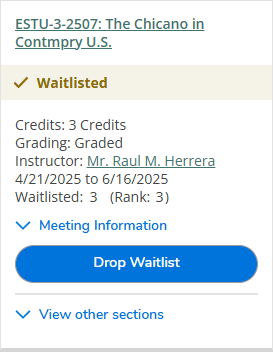
Also displayed is the number of waitlisted students, and your position ("rank") on the waitlist.
Clear any Prerequisites outside of DualEnroll
Some courses have a prerequisite which students must clear before they can be registered.
- Prerequisite courses must be completed with a grade of C or better
- Learn how El Camino College credits AP Exam scores
- For help to interpret common prerequisites, see Prerequisites & Equivalencies
If you have not already started or completed a prerequisite course at El Camino College, use this form to upload your high school transcript, other college transcript, or AP Score Report PDF showing you have completed the prerequisite course.
Academic Counseling staff will review your uploaded documentation and add the appropriate clearance to your El Camino student account.
Students on a waitlist who have not cleared the prerequisite cannot be registered for the class.
What happens next?
- Before the class starts: If seats in the class become available before the Start Date, then waitlisted students are automatically enrolled in the class in order of rank (usually overnight).
- After the class starts: On or after the Start Date, the only way to enroll in a class is with Authorization to Add from the instructor of the class. How do I Add a Class?
Closed Class
Waitlists usually hold 10 students. Once a waitlist is full, the class will show as "Waitlist full" or "Closed" in the Online Class Schedule.
In DualEnroll, high school students who select and are approved for a class which is Closed see a status of "Student: Choose Another Section" and cannot join the waitlist at this time.