
How do I Add a Class?
After a class starts, the only way to enroll is with Authorization to Add. This authorization is provided by the instructor of the class at their discretion.
K-12 students must have completed Steps 1-4 of the Steps for Dual Enrollment to add a class.
Follow the instructions below for support to add an On Campus or Online class.
Deadline to Add
The Add/Drop Period is typically the first two weeks of a 16-week class — and shorter for a 12-week, 8-week, 6-week, or 5-week class.
- El Camino's Academic Calendar displays the Last Day to Add for full semester classes and for summer and winter classes
- For short-term classes, refer to the IMPORTANT DATES link in the notifications area
of MyECC (top of the student Home screen)

Authorization for On Campus class
Attend the first class meeting and speak with the instructor about adding their class.
Authorization for Online class
Email the instructor no more than a week before the class Start Date using your @elcamino.edu email address.
- The easiest way to find an instructor's email address is by searching the Faculty and Staff Directory
- A link to this Directory can also be found at the top of every www.elcamino.edu webpage
Include in your email:
- Your name and ECC ID Number
- The full Section Name of the class you wish to add (example: HIST-C1001-1234)
- Whether you are on the Waitlist
Register using MyECC
After receiving Authorization to Add, students register using MyECC.
- Follow this guide to Search for Classes and then Register for Classes using MyECC: Help to Register PDF
Once you get to the Register for Classes screen, the class sections for which you have been authorized will display "Authorized for Add"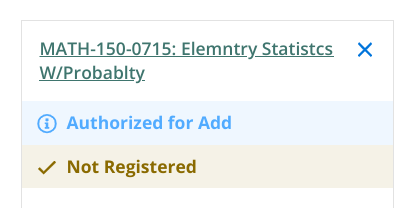
- Click the blue Register button to officially join the class.

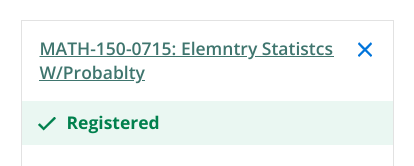
If successful, the class will show a green checkmark and display "Registered."
Registered Online/Hybrid classes will not appear in Canvas immediately — it can take a few hours or sometimes overnight. Find your Online Classes
Important Notes
- Authorized students can only register after the class has started. Click the Register button on or after the Start Date to join the class.
- K-12 students must have completed Steps 1-4 of the Steps for Dual Enrollment before they can register
Clear any Prerequisites outside of DualEnroll
Some courses have a prerequisite which students must clear before they can be registered.
- Prerequisite courses must be completed with a grade of C or better
- Learn how El Camino College credits AP Exam scores
- For help to interpret common prerequisites, see Prerequisites & Equivalencies
If you have not already started or completed a prerequisite course at El Camino College, use this form to upload your high school transcript, other college transcript, or AP Score Report PDF showing you have completed the prerequisite course.
Academic Counseling staff will review your uploaded documentation and add the appropriate clearance to your El Camino student account.
Students with add authorization who have not cleared the prerequisite will receive a "The following required prerequisite is not started" error message when registering for the class.
Support is Available!
If you receive Authorization to Add from an instructor but are unable to register, please email [email protected] and include the following:
- Your Full Name
- Your El Camino Student ID Number
- The Section Name for which you have been authorized to add (example: HIST-C1001-1234)
Students can also:
- Call the Dual Enrollment Office 310-660-3344 during open hours (Monday-Friday 9:00 a.m.-5:30 p.m.)
- Submit the Admissions & Records Office's Add/Drop Form by the Last Day to Add