
South Bay Regional Explorer Academy
This course is available to students from the age of 14 to 20. Enrollment in this course requires concurrent participation and prior acceptance into one of the participating Police Explorer Youth Programs in this region.
After the student has completed a law enforcement explorer application with one of the police agencies, the student will be prepared to enroll in this course.
This course is identified as Administration of Justice 190 (or AJ 190) in the El Camino College Catalog. Course Description
Overview
The steps to enroll in AJ 190 are different for high school, middle school, and college
students.
Select a tab below to see an overview of the steps.
- Apply for Admission (typically takes 1-3 business days to create your student account)
- Sign into MyECC (less than 1 business day after receiving Welcome Email)
- Complete steps in DualEnroll (student, parent, and high school need to complete steps)
Scroll down for more information and support with each step.
Students in Grades K-8 must complete different steps to be eligible for Dual Enrollment — including obtaining approval from the El Camino College dean who oversees their desired course(s).
- Apply for Admission (typically takes 1-3 business days to create your student account)
- Sign into MyECC (less than 1 business day after receiving Welcome Email)
- Submit Completed Dual Enrollment Form (with student, parent, and middle school, and dean signatures)
- Register for Classes (online using MyECC)
For support with these steps, see Steps for Grades K-8.
College students register for classes using MyECC — like any other El Camino College class.
- Apply for Admission (typically takes 1-3 business days to create your student account)
- Sign into MyECC (less than 1 business day after receiving Welcome Email)
- Register for Classes (online using MyECC)
For support with these steps, see Steps 1, 2, and 4 of the Steps for Grades K-8.
- Apply for Admission (typically takes 1-3 business days to create your student account)
- Sign into MyECC (less than 1 business day after receiving Welcome Email)
- Complete steps in DualEnroll (student, parent, and high school need to complete steps)
Scroll down for more information and support with each step.
Students in Grades K-8 must complete different steps to be eligible for Dual Enrollment — including obtaining approval from the El Camino College dean who oversees their desired course(s).
- Apply for Admission (typically takes 1-3 business days to create your student account)
- Sign into MyECC (less than 1 business day after receiving Welcome Email)
- Submit Completed Dual Enrollment Form (with student, parent, and middle school, and dean signatures)
- Register for Classes (online using MyECC)
For support with these steps, see Steps for Grades K-8.
College students register for classes using MyECC — like any other El Camino College class.
- Apply for Admission (typically takes 1-3 business days to create your student account)
- Sign into MyECC (less than 1 business day after receiving Welcome Email)
- Register for Classes (online using MyECC)
For support with these steps, see Steps 1, 2, and 4 of the Steps for Grades K-8.
High School Students — Steps for AJ 190
It is the responsibility of the high school student to complete the steps below to dual enroll in El Camino College classes.
Important update! El Camino College is now using CCCStart
After creating your OpenCCC account, you will be directed to CCCStart instead of the CCCApply application for admission. We will be updating our webpages with support for CCCStart in the coming weeks.
Students use CCCStart to apply to El Camino College. Your application is used to create your El Camino College student account.
- If you already have an El Camino College student account and have not missed consecutive fall and spring semesters since the term for which you applied, proceed to Step 2.
- Students need to Apply for Admission Again if they do not enroll in classes for consecutive fall and spring terms — and also to attend El Camino College after high school.
Important Notes!
Please read before clicking the link for CCCStart.
- Applying is a two-part process: first to create an OpenCCC Account, and then to complete and submit your CCCStart application. Take your time and enter all identifying information accurately.
- Do not use your school email address. Doing so may lead to issues with verification or receiving your Welcome Email. Use a personal email address which you can access now and after high school.
- Select the Program which sounds best to you at this time. Applicants must select an El Camino College Program (an educational goal) to apply for admission.
- Select Program with the correct Start Term. Programs are listed multiple times with different Start Terms. Students who select a program with a Start Term of Spring 2027 will be eligible for Spring 2027 classes (and beyond) – but will not be eligible for earlier Fall 2026 or Winter 2027 classes.
Link to CCCStart
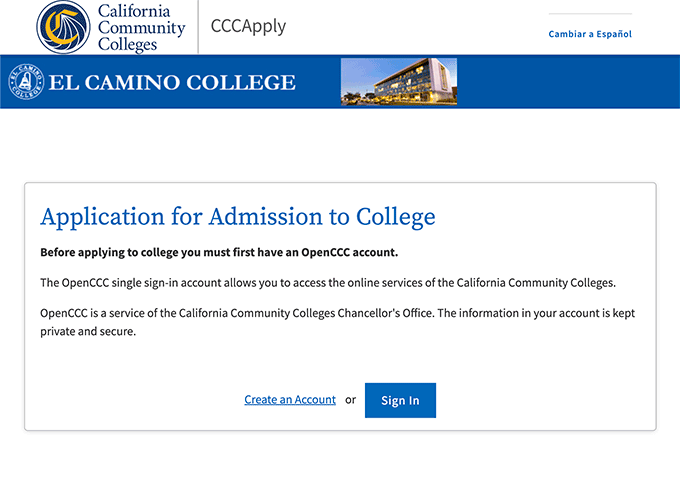
For help with CCCStart, refer to these links:
- CCCStart Quick Start Guide and FAQs
- Filling Out Your CCCStart Application — help to complete the application's four core sections: Personal Information, Academic History, Supporting Information, and College Materials.
- Submitting and Monitoring Your CCCStart Application
Reminder! To attend El Camino College after high school, students need to apply for admission again as a first-time college student. See also: What happens after I graduate from high school?
Below are tutorials to make sure students have successfully applied to El Camino College, receive their Welcome Email, can sign into MyECC — and more!
Welcome Email
After you submit an application for admission, you will receive a few different emails right away — one of which will contain your 8-digit Confirmation Number.
Within 1-3 business days, you will be sent your Welcome Email with important information about your El Camino student account.
Sign into MyECC
The first time you sign into MyECC, you will prompted to create a new secure password.
Multi-Factor Authentication
Required security feature! Follow these steps if you see "Let's keep your account secure" when signing into MyECC.
Update your Account
In case you need to update or correct the information on your El Camino student account.
Starting Fall 2026, Grades 9-12 use DualEnroll for to register for El Camino College classes.
Students, Parents, and High School authorized users (typically a counselor or administrator) each complete steps in DualEnroll.
It is the responsibility of the Student, Parent, and High School to complete their steps before the Start Date of the class.
Student Steps
High school students use DualEnroll to initiate registration for their AJ 190 class.
Follow the directions in this Student Guide for ECC Classes:
Parent Step
Parent Consent is a step that is completed by a student's parent or guardian.
This step is completed only one time! For more information, see Page 7 of the Student Guide.
High School Step
Every class selected in DualEnroll requires approval from a high school counselor or other administrator.
Registration
After both Parent and High School steps are completed, DualEnroll will attempt to register you for the class.
Check Your Status
Students can click the Status tab in DualEnroll to check what step they are on for each class.

Registered classes will show a status of "Complete" in DualEnroll.
Here are links and information for high school students to connect with El Camino College support staff!
Dual Enrollment Office
For support with DualEnroll and any of the above steps.
- Dual Enrollment Zoom Help is available every Tuesday, Wednesday, Thursday from 4:00-5:00 p.m.
- We are also available at (310) 660-3344 during open hours. For help with DualEnroll, please call while using a computer or mobile device to let us know what you are experiencing on your screen.
- Another option is to send a screenshot of your issue to [email protected] along with your full name, date of birth, and ECC ID Number (if known).
Warrior Welcome Center
For support to apply for admission, sign into MyECC, and reset your MyECC password.
Zoom Link- Online Hours: Monday-Friday 8:00 a.m.-5:00 p.m. (Closed Fridays during summer)
- On-Campus Hours: Monday-Friday 8:00 a.m.-5:00 p.m. (Closed Fridays during summer)
- Location: Student Services Building, 1st Floor (near west entrance)
- Check the Warrior Welcome Center webpage for updates
Help Desk
For support with Multi-Factor Authentication.
- Email: [email protected]
- Phone: (310) 660-6571
- Office: ITEC Building, Room 140
Monday-Thursday 8:00 a.m. to 5:00 p.m.
Friday 8:00 a.m. to 3:00 p.m. (except during summer)
After You Are Registered
Registered classes will show a status of "Complete" in DualEnroll.
Below are tutorials and links to get ready for your classes!
Your officially registered and waitlisted classes are visible in MyECC.
In case you need to drop your registered class.
Enrolled courses and grades earned will appear on your El Camino College transcript for college credit.
Any and all high school credit is determined by your high school. Each high school sets their own policies and procedure to obtain credit, but commonly involves submitting your El Camino College transcript after you receive your final grade.
For support with transcripts, follow this tutorial:
Questions?
Email dualenrollment@elcamino.edu
View Frequently Asked Questions
Go to Help & Events
Call 310-660-3344
Dual Enrollment Office
Fall 2026 Hours
Monday-Friday
9:00 am-5:30 pm
Library 167 (north side of Distance Education Center)